What does a Claude Code enterprise setup need first?
A Claude Code enterprise setup is five controls an admin owns. Managed settings, plugins, review, metrics and a gateway, with a checklist to copy.

Set up the agent before the whole team does
Five controls an admin owns, in the order a rollout needs them.
Which of the five controls does your team have today?
KaaS Newsletterkaas.team/newsletter
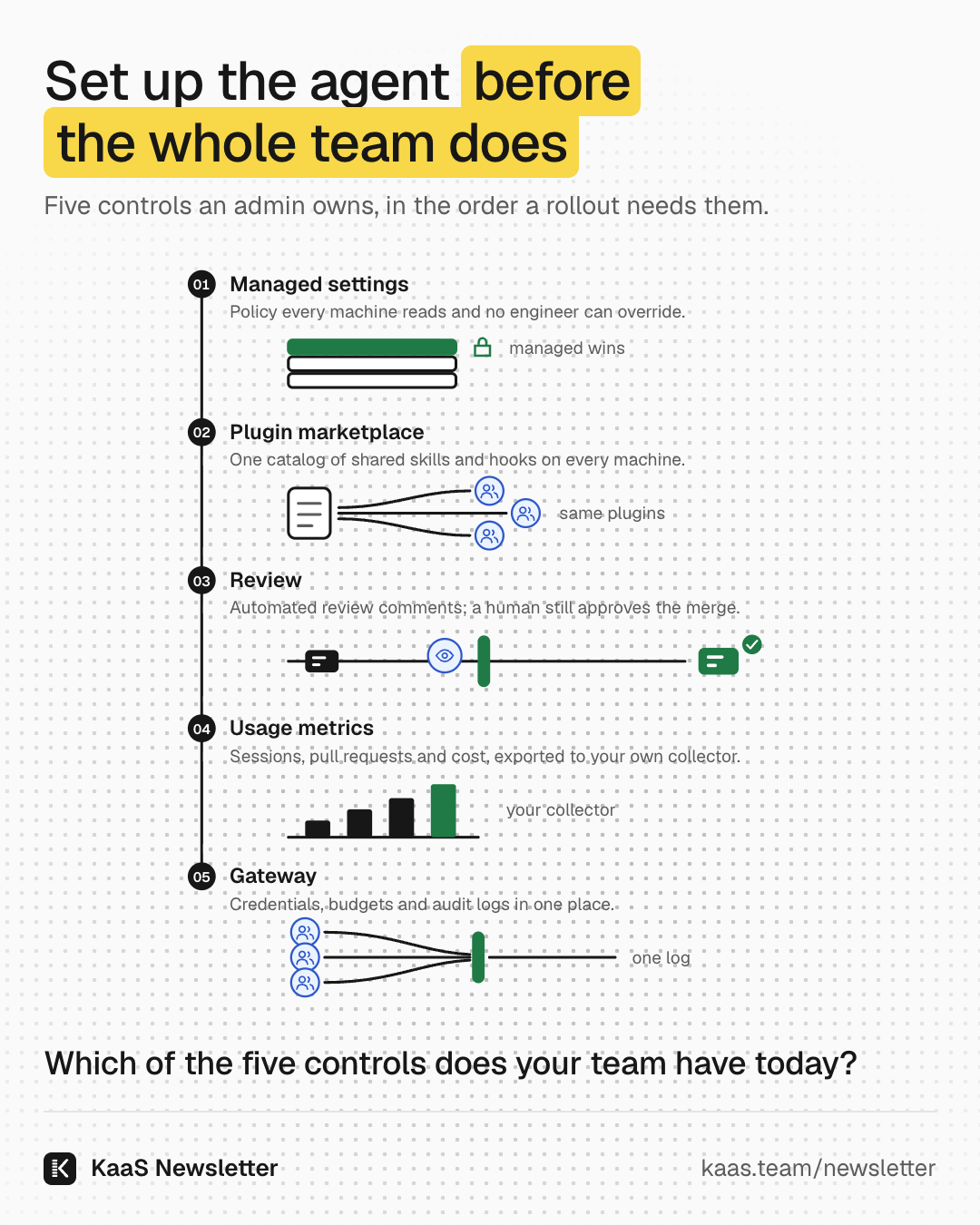
To set up Claude Code for an enterprise team, put five controls in place before the seats go out. Deliver managed settings so policy cannot be overridden, and publish a plugin marketplace so every engineer loads the same skills and hooks. Keep a human on every merge with automated review as one layer, and export usage metrics so you can see what the team does with the agent. Route model traffic through a gateway so credentials, budgets and audit logs sit in one place.
We argue a team rollout should start with five controls an admin owns, because by default each engineer's setup is private and nobody sees the whole team. One engineer allows a command, another installs a helper from a stranger's repository, and a third points the agent at a personal key.
None of that is wrong for one person trying the tool. It is wrong for a team of 20 to 150 engineers shipping to production, because the leader cannot answer three plain questions: what can the agent touch, who checked its work, and what did it cost. Every control below answers one of them, and every one is a feature the vendor documents today.
This post is for the platform lead or engineering manager who has been asked to roll the agent out. Each section names one control, the options you have for it, and the one choice we would make first.
Engineers adopt agents faster than review can absorb them
The reason to do this now is that the agent changes where the work piles up. Writing code gets faster, and the queue moves to review and to the people who own production. One engineering analytics vendor measured review time on teams with high AI adoption and found it rose 91%1.
longer pull request review time on teams with high AI adoption
That is one vendor's data and it shows association, not cause. It matches what practitioners describe. The tool removes work in one place and adds it somewhere else.
we remove friction from some places like code authoring and testing, but then add friction in other places
The publisher of the DORA research reports that AI adoption still has a negative relationship with software delivery stability3. Adoption alone does not make a team safer. What changes the outcome is the system around the agent, and that system is what an admin can set up.
So the question for a leader is not whether engineers will use the agent. They already do, often on personal plans with personal settings. The question is whether the team's agentic software development lifecycle, the agentic SDLC, has rules that hold on every machine, or only rules that each engineer remembers.
Managed settings are the one layer engineers cannot override
The vendor's admin guide says it plainly: the tool enforces organization policy through managed settings that take precedence over local developer configuration4. Everything else in this post depends on this layer, so set it up first.
The settings page lists the order, highest first: managed settings, command line, project local, shared project, user5. A key set at a higher level wins over the same key lower down. That means a rule you put in managed settings beats anything an engineer writes in their own file.
Lists behave in a useful way. Allow and deny lists merge from all sources, so developers can extend managed lists but not remove from them4. You can deny reads of secret files for everyone and still let a squad allow its own test command.
You have three ways to deliver the policy. Server-managed settings come from the admin console, and the tool fetches them at startup and refreshes them hourly during the session, with no endpoint infrastructure to deploy4. A device policy through your device management system resists tampering because it needs admin rights to write4. A managed-settings.json file in a system folder works on every platform.
Our choice for a team of this size: start with server-managed settings if you are on a team or enterprise plan, and add the file or device policy for machines that sign in another way. Here is a starting file that holds the other four controls too. Copy it, change the names, and keep the gateway credential in your secrets tooling, not in this file.
managed-settings.json{
"permissions": {
"deny": ["Read(./.env)", "Read(./.env.*)"]
},
"strictKnownMarketplaces": [
{ "source": "github", "repo": "anthropics/claude-plugins-official" },
{ "source": "github", "repo": "your-org/*" },
{ "source": "skills-dir" }
],
"extraKnownMarketplaces": {
"your-marketplace": {
"source": { "source": "github", "repo": "your-org/your-marketplace" }
}
},
"enabledPlugins": {
"team-review-rules@your-marketplace": true
},
"disableSideloadFlags": true,
"allowedProviders": ["customEndpoint"],
"env": {
"ANTHROPIC_BASE_URL": "https://llm-gateway.example.com",
"CLAUDE_CODE_ENABLE_TELEMETRY": "1",
"OTEL_METRICS_EXPORTER": "otlp",
"OTEL_EXPORTER_OTLP_PROTOCOL": "grpc",
"OTEL_EXPORTER_OTLP_ENDPOINT": "http://collector.example.com:4317"
}
}To check it reached a laptop, ask an engineer to run the status command inside the agent and read the setting sources line. If the managed entry is missing, the policy did not load, and nothing else in this post is enforced on that machine.
A plugin marketplace gives every engineer the same skills and hooks
Once policy holds, the next gap is shared practice. Your best engineer has a review skill, a hook that runs the linter, and a command that opens a pull request the way your team likes. Nobody else has them, because they live in one person's home folder.
A plugin marketplace fixes that. The vendor's guide says to create your own marketplace when you want your team or organization to install your plugins and keep receiving your updates from a catalog you control6. It is a repository with one catalog file that lists each plugin and where to fetch it.
Rolling it out takes two keys in managed settings. One registers the marketplace on each machine and the other names the plugins to install and enable from it7. Engineers then see the plugins at the start of their next session, with no install step.
The third step is the one teams skip. A managed allowlist and blocklist decide which marketplace sources plugins may come from7. Without it, anyone can add a stranger's marketplace, and its hooks run on your engineers' machines.
So the order is: register the marketplace, enable the plugins, then allowlist the sources. Note one trap the docs call out: the allowlist doesn't register anything7. You need both the registration and the allowlist, as the starting file above has.
What goes in the first plugin? Keep it small. We would start with the team's review rules, the test and lint commands, and one hook that blocks the agent from touching secret files. Add a plugin only when an engineer has copied the same setup by hand for the second time.
Automated review is one layer and a human still merges
The agent can also review. The vendor's review service sends several agents to read each change alongside the surrounding code, looking for logic errors, security vulnerabilities and broken edge cases8. Findings arrive as inline comments on the pull request.
What it does not do matters more. A review never approves or blocks the pull request, so the decision to merge stays with your team8. The docs also warn that a review with no findings doesn't mean your code is error-free or secure8.
Treat it as a gate in a row of gates. Checks pass first, then automated review comments, then a human approves. Each gate catches a different kind of mistake, and none of them replaces the owner of the change.
Human accountability is still central for code that is reviewed and merged by Claude.
That is the vendor's own security lead describing how his company works. The same write-up lists shadow mode for all new AI reviewers9, meaning a new reviewer posts comments for people to judge before anyone trusts it.
Two settings make review fit your team. A REVIEW.md file in the repository tunes what gets flagged, and the service reads it from the base or default branch and never from the pull request's own changes8. So a change cannot quietly loosen its own review. Put your team's rules there, the same rules as the review plugin, so the agent writes and reviews against one standard.
Usage metrics and a gateway show what the rollout costs and changes
The last two controls answer the leader's third question, what it cost and what it changed. Both are set in the same managed file.
Usage metrics come first because they are cheap. Administrators can configure OpenTelemetry settings for all users through the managed settings file10. The agent then exports sessions, lines changed, pull requests, commits, tokens and cost to your own collector. One metric tracks actual time spent actively using the tool, excluding idle time10.
A repository cannot switch this on for itself. The docs say a repository can't use them to turn telemetry on, choose where it goes, or capture content10. That is why it belongs in managed settings. Read the metrics by team next to review wait and incidents, never as a leaderboard of individuals.
The gateway is the heavier choice. You can let model traffic go straight to the provider, which leaves a key on every laptop. Or you can send it through a gateway, where the provider key stays server-side and developers hold gateway credentials instead11.
Through a gateway you get one audit log, because it can log every model request for compliance11. Budgets and rate limits live in one place too. Pin it with the allowed providers setting, and the tool then refuses a session pointed anywhere else, including at Anthropic directly or at a developer's own proxy11.
Be honest about the cost. The docs say the tradeoff is that the gateway becomes infrastructure your organization operates11. If you have no platform team to run it, start with usage metrics and the plan's own spend controls, and add the gateway when audit or budget needs force it.
The five controls turn private habits into a team system
Step back and look at what the five controls do together. Each one moves a decision from one engineer's laptop to a place the team can see and change.
- Managed settingsPolicy every machine reads and no engineer can override.Platform lead
- Plugin marketplaceShared skills and hooks, from sources you allow.Platform lead
- ReviewAutomated review comments; a human approves the merge.Owning engineer gate
- Usage metricsExported by team to your own collector.Engineering lead
- GatewayOne audit log, one budget, no keys on laptops.Platform lead
None of this needs a big programme. The managed file above is a day of work for one platform engineer, and the marketplace can start with one plugin. What takes longer is the habit around it: owners who explain agent changes before review, and leaders who read flow measures before they call a gain real.
That habit is the part a settings file cannot hold. If you want help with the setup itself, our Claude Code rollout installs these five controls with your platform team. If you want your engineers to learn the habits around them, the masterclass on the agentic SDLC walks a real change from ticket to merge.
What to do on Monday
- Deliver managed settings first. Pick server-managed settings or a device policy, deny reads of secret files, and confirm the status line shows the managed source on one laptop.
- Publish one team plugin marketplace. Put your review rules, test command and one safety hook in a single plugin, register the marketplace and enable the plugin in managed settings.
- Allowlist your marketplace sources. Allow the official marketplace and your own, and turn off the flags that load plugins from a local folder.
- Keep a human on merges. Turn on automated review, write a REVIEW.md with your team's rules, and keep approval with the owner of the change.
- Export usage and route traffic. Send telemetry to your own collector from managed settings, and decide whether a gateway is worth running yet.
Which of the five controls does your team have in place today?
Param
Sources
- Faros AI, The AI Productivity Paradox, 2025
- The Pragmatic Engineer, how tech companies measure the impact of AI, 2025
- Google Cloud blog, Announcing the 2025 DORA Report, 2025
- Anthropic, Set up Claude Code for your organization, 2026
- Anthropic, Settings files and precedence, 2026
- Anthropic, Create a marketplace, 2026
- Anthropic, Manage Claude Code plugins for your organization, 2026
- Anthropic, Code Review, 2026
- Anthropic, How Anthropic secures its AI-native software development lifecycle, 2026
- Anthropic, Monitoring usage, 2026
- Anthropic, Other LLM gateways, 2026